An AI thumbnail maker works by turning what you hand it into a written instruction for an image model, which then draws one new picture for you to check. You give it some mix of four things: a thumbnail to start from, a description of what you want, a photo of yourself, and the exact words to print. The model draws the whole thumbnail at once, and you ask for changes in plain words.
We make WThumb, an AI thumbnail maker for YouTube, and it works this way too, with three ways in (Recreate, Prompt and Templates) and Edit for changes. We read every Google and YouTube page linked in this post on November 20, 2026, and the other tools' own sites the same day.
What you give an AI thumbnail maker
Picture a designer who knows nothing about your video except what you put in front of them. That's where an AI thumbnail maker starts, and in WThumb the inputs come in four kinds.
- A thumbnail to start from. In Recreate it comes from a YouTube link (only that video's public thumbnail is fetched), an upload (PNG, JPEG or WebP, up to 12 MiB) or the Library of top performers from popular channels.
- A description. What should change, or what the picture should show: up to 1,200 characters in Recreate's Changes box, or 2,000 in Prompt's one box.
- A photo of you. In WThumb that's a persona, a name and up to eight saved portraits. Each run picks the photo that faces the way the reference does, else the primary one, and Make waits until you pick your persona or Faceless.
- The words to print. In Recreate they go in the Changes box with every other change, said plainly, like change the title to "I QUIT". Words on the reference that you don't change keep their wording.
Up to four extra images, such as a product shot or a logo, can go in too, placed in the text with @. On Recreate the model is told to show each one whole and unchanged where its words say, so check that it did.
1,200
Characters in Recreate's Changes box
2,000
Characters in the Prompt box
4
Extra images, each placed with @
8
Portraits a persona can hold
How your inputs become one written instruction
An image model never sees the boxes you filled in. It gets one block of text with any pictures attached, so writing that text is most of the maker's job. In WThumb each way in has a fixed instruction of its own, and your parts are filled into it: which picture is the reference and how closely to follow it, which persona photo to use, the words to print, your changes, and where each extra image goes.
You never see that text, and some of it asks for things you didn't type. With Faceless, for instance, the model is told to remove any real person in the reference and put nobody in their place, while keeping a game or cartoon character, a creature or a mascot.
A general image tool leaves the whole instruction to you. Google's Generate & edit images with Gemini Apps page advises you to include a detailed visual description of what you want in the image, and to describe the style. A thumbnail maker writes the thumbnail half of that for you, so your half can stay short.
I think it's wrong that people think they need super prompt systems to make good designs. If you technically know the job you're going to do, you can explain it very simply and get it made.
What the image model actually draws
The model doesn't cut your photo out and paste it onto the reference. It draws a new picture, the face and the letters included, which is why a result can look finished and still misspell a word or drop a digit.
In WThumb each picture is its own run. A 16:9 comes back at 2048 x 1152 and a 9:16 at 1152 x 2048, both Full HD+ JPEGs, in about thirty seconds. Turn on both formats and two designs, and one press of Make starts four runs at 1 credit each (1 credit = 1 thumbnail). A run that fails gives its credit back.
In Recreate, WThumb asks the model to follow the reference closely for a single design and for the first of a pair, bringing in your persona or Faceless, your words and your changes. The second of a pair treats the reference as a brief and starts fresh.
Hand over the inputs
A reference, a description or a template card, your persona or Faceless, the words, and any extra images.
Typed words are checked
A moderation service reads what you typed. A refused request costs nothing.
One instruction is written
WThumb fills your parts into the fixed instruction for that way in.
The model draws it
An image model draws the whole thumbnail and returns a Full HD+ JPEG in about thirty seconds.
You check and change
Read every letter, then press Edit to describe a change or mark one part.
Why a reference picture does so much of the work
A finished thumbnail has already settled where the subject stands and how big the words are, so the image model has far less to guess. When you have an example design in hand, it's very capable. Making something from scratch is harder. That's why I think a reference design is important.
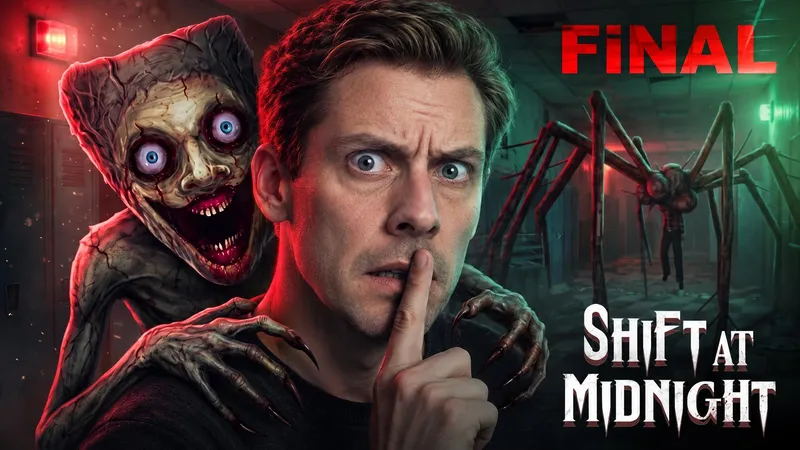
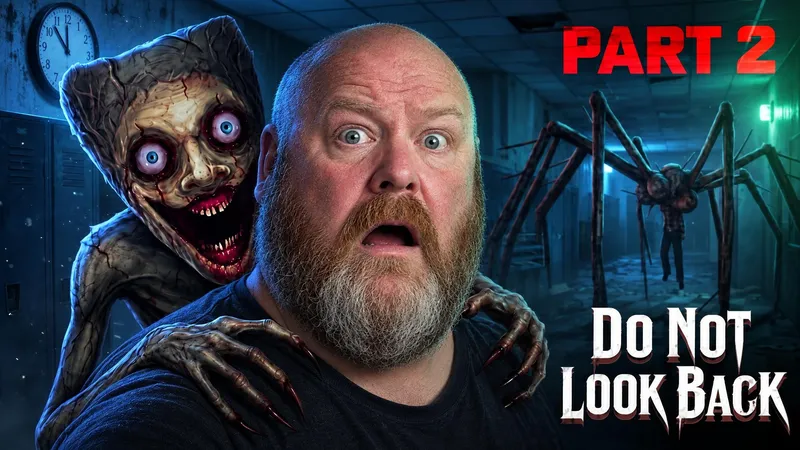
Prompt, WThumb's start with no reference, is built for the creator who can already picture the thumbnail and say it in a few sentences, and for an idea no existing thumbnail shows.
But if you don't have design knowledge, steering it can be very hard here, and whatever you do, if you didn't give a reference image, getting a good design out of it can be hard.
Templates gets around that. Each card carries a ready-made layout and look, like a reference you didn't have to find: you describe what you want on the thumbnail and type the words, and WThumb keeps the card's layout while the subject changes to fit your video.
| Way in | What you give it | What the instruction asks for | What comes back |
|---|---|---|---|
| Recreate | A reference, your persona or Faceless, any changes (the words to print among them) and images | Follow the reference closely for one design or the first of two; design the second fresh from it | 16:9, 9:16 or both; one design or two |
| Prompt | One description with any words in it, your persona or Faceless, any images | The picture you described; two designs send the same prompt twice | 16:9, 9:16 or both; one design or two |
| Templates | A Classic or Faceless card, what you want on it and your words, and a persona on a Classic card | The card's layout and look, with your topic and words | One 16:9 thumbnail |
Checking the picture, then changing what's wrong
The last step is yours: read every letter, and with Faceless, look for anyone who shouldn't be there, since removing people is an instruction the model can miss. Then hold the picture to YouTube's rules: its Add custom thumbnails page says all custom thumbnail images must follow its Community Guidelines, and that you can upload your own if your account is verified.
You don't have to disclose the AI help, though. On YouTube's Disclosing use of GenAI content page, using generative AI tools to create or improve a thumbnail falls under production assistance, one of the minor uses creators don't have to disclose.
When something's off, WThumb changes it in words. Press "Edit" under any finished picture, describe the change in up to 1,200 characters and press "Make the change". A change in words alone redraws the whole picture, told to keep everything the change doesn't mention, so small things elsewhere can shift.
For a fix to one part, turn on "Mark an area" in the same Edit box, mark the part with "Draw around" or "Brush" and type what it should become. The marked parts are redrawn and the rest of the picture stays as it was. Mark an area works only on thumbnails made in WThumb. Either kind of change uses 1 credit, and any version can be changed again.
When a result misses badly, the fix is usually in the brief. A simple explanation. Reference content or a reference picture. Knowing what you want. If you have no idea of the result you expect and you're saying "let the AI make them and I'll pick one", you'll probably write prompts for a long time and get no result. What to do when an AI thumbnail comes out wrong goes through the usual causes.
How other AI thumbnail tools do it
Other tools make the same moves from different starting points, going by what their own sites say. What YouTubers use to make thumbnails sets AI makers beside editors, template tools and designers.
- YouTube's Ask Studio. It starts from the video. The Add custom thumbnails page says it analyzes your video's transcript and themes to suggest thumbnails, and YouTube's Learn about Ask Studio page says you can upload up to 10 images to generate reference thumbnails, and that quality and accuracy of responses may vary.
- Pikzels. Its home page says you can describe your idea in one prompt or paste a YouTube link and have it recreate the thumbnail format. A Persona comes from three photos of yourself, and its Edit takes the change you type.
- Thumbmagic. Its home page starts from the video too: paste a YouTube URL, a transcript file or the video itself, add your face and pick a style. It also lists a thumbnail editor for text, colors, backgrounds and expressions.
- General image tools. The Gemini page says you can upload several images and ask for a new image based on them. That's the reference step done by hand, with the rest of the instruction left to you.
YouTube's own tool gets a full walk-through in YouTube's Ask Studio thumbnail generator.
How to do this in WThumb
- Pick a way in. The Studio opens on "Recreate". Press "Prompt" to describe the picture instead, or "Templates" to start from a card.
- Hand over the inputs. On Recreate, add a reference with "Link", "Upload" or "Library" and type the words and any other changes in the Changes box, each on its own line. On Prompt, describe the picture and its words in the one box. On a template card, fill in "Prompt" and "Text on the thumbnail" (optional on some cards).
- Pick your persona or Faceless. A Classic template needs a persona; a Faceless one takes none.
- Press Make. Anything still missing is listed under the bar, and a visitor signs in here with the brief kept. New accounts get two free credits, with no card.
- Check it, then change it. Read the letters. Press "Edit" for a change in words, turn on "Mark an area" for one part, or press "Make the Shorts version" under a 16:9 picture where it's offered.
A brief to paste
- Recreate's Changes box, line 1. Change the title to "DO NOT LOOK BACK".
- Line 2. Swap the red alarm light for a big round wall clock.
- Line 3. Turn the red glow cold blue.
- Prompt, with your persona picked. Thumbnail for a video comparing a cheap microphone with a pro one. Me holding the cheap one to my ear, the pro one on the desk beside me, dark room, warm light on my face. Words on it: CHEAP VS PRO