YouTube dynamic thumbnails are a Studio feature YouTube announced on September 23, 2026: you give one video three thumbnails, and YouTube recommends the best of the three to each segment of your audience instead of crowning one image for everyone. Think of a cooking channel whose regulars come for the host's face while newcomers are drawn in by the dish. Today that channel has to pick one of the two pictures. With dynamic thumbnails, both could stay in use.
It isn't live, though. YouTube hasn't said when it launches, which channels get it or exactly how the segments are drawn, and until it does, Test & compare is the tool you can actually use. We read every YouTube page linked in this post on November 20, 2026, and checked the press reports on the feature the same day.
What YouTube has announced about dynamic thumbnails
The announcement came at Made on YouTube. In New tools to power your creation journey from start to finish, posted on YouTube's blog on September 23, 2026, YouTube VP Aparna Pappu wrote that you can "use dynamic thumbnails to have YouTube recommend the best of three options to different segments of your audience." The line sits under the heading "Your personalized Studio team," beside a clip captioned "Dynamic thumbnails in Ask Studio," so YouTube showed it as part of Ask Studio, the assistant inside YouTube Studio.
The same post puts two related plans next to it. A video version of testing is on the way, letting you try up to three video cuts to see which hook performs best. And it says Ask Studio can run in the background to review your older videos, suggesting and testing refreshed thumbnails. The post also counts more than 40 million experiments creators have run on titles and thumbnails since YouTube's testing feature officially launched in 2024. None of the new pieces comes with a date.
The details came later, in conversations YouTube published. Two days after the event, a short Creator Insider video demonstrated the new Studio features and, as PPC Land reported, described them as coming to YouTube Studio without giving a date. On October 27, on the Creator Insider channel, Todd Beaupré, YouTube's senior director of discovery and growth, talked through how dynamic thumbnails would decide, as Net Influencer reported three days later. Then on November 16 YouTube's blog published a recap of Paddy Galloway's sit-down with Amjad Hanif, YouTube's VP of Creator Product, and summed the feature up: "you provide three thumbnails and they will be served to different audience segments automatically based on which one performs best for that group."
September 23: announced
Made on YouTube introduces dynamic thumbnails: YouTube recommends the best of three options to each audience segment.
September 25: first demo
A Creator Insider video demos the features, described as coming to YouTube Studio, with no date or eligibility rules.
October 27: segments explained
Todd Beaupré names viewer location and past watching of the channel as signals. No launch date is given.
November 16: blog recap
You provide three thumbnails, and each audience segment is served the one that performs best for it.
Launch: no date yet
None of these posts or videos says when dynamic thumbnails reach YouTube Studio, or for which channels.
What isn't known yet
For now, the gaps are about as big as the answers, and five of them matter if you're planning around the feature.
- When it launches. None of YouTube's posts gives a date, and the press reports on the Creator Insider videos found none either. Net Influencer's October 30 report says YouTube hasn't given a public launch date, and the November 16 recap describes the feature without saying whether it's live.
- Who gets it. Test & compare needs advanced features and a computer, according to its help page. Nothing published says whether dynamic thumbnails will ask for the same.
- What it optimizes for. Test & compare decides on watch time share. The recap says "performs best" and stops there, so the metric behind dynamic thumbnails isn't public.
- Shorts. Test & compare doesn't run on Shorts, and none of YouTube's posts about dynamic thumbnails mentions Shorts either way.
- How the segments are drawn. Beaupré, in Net Influencer's account, said the system would start with some randomness and then use segment features. He named the viewer's location and, the one he said he was most excited to test, how much a viewer has watched the channel before.
He also described the aim as a set-it-and-forget-it tool: you upload the options once instead of swapping images by hand, and traffic drifts toward the image that does better, with some randomness kept so the system keeps learning. Net Influencer adds that YouTube hasn't said which segment signals will be there at launch.
That second signal is the one to plan around, and YouTube's November 16 recap points the same way: it names regular viewers and new viewers among the audiences that respond to different types of thumbnails. If one group is people who already watch you and another is people who've never seen you, your three versions should speak to those two groups differently, and that's work you can do before anything ships.
How dynamic thumbnails differ from Test & compare
Test & compare is the version you can use today. When TeamYouTube rolled it out in a June 2024 post, every chosen thumbnail got an even share of the video's viewers, and the winner was the one with the most watch time share. The same feature's help page now says you can test and compare up to 3 different titles and thumbnails from YouTube Studio on a computer, that a test should be completed within two weeks, and that the option with the highest watch time is then shown to all viewers.
So a Test & compare run ends with one image for everyone. Beaupré called today's test "pretty much an even split randomly who sees it," in Net Influencer's report. Dynamic thumbnails would change both ends of that: the split leans toward whatever does better as the data comes in, and rather than one image winning outright, each segment can end up with its own. What to change between Test & compare thumbnails goes deeper on the live tool.
| Question | Test & compare | Dynamic thumbnails |
|---|---|---|
| Status | Live in YouTube Studio | Announced September 23, 2026, no launch date |
| Images per video | Up to 3 titles and thumbnails | Three thumbnails |
| How viewers are split | Evenly while the test runs | Shifted toward the image that does better |
| What decides | Watch time share | Not stated; the recap says performs best |
| At the end | One option shown to all viewers, or your first upload if inconclusive | Each segment gets the image that performs best for it |
| Where you set it up | YouTube Studio on a computer | Shown in Ask Studio; devices not stated |
| Shorts | Not available | Not stated |
3
Most thumbnails per video in either feature
2 weeks
Longest a Test & compare run should take
40M+
Title and thumbnail experiments since 2024
The two may well sit side by side. Nothing YouTube has published says Test & compare goes away, and the September 23 post presents those 40 million experiments as the success its new tools build on.
Why one thumbnail might not suit every viewer
YouTube's own advice already assumes your audience isn't one crowd. Its Thumbnail & title tips page pictures two kinds of viewer: for subscribers, a thumbnail might highlight familiar features, like your best friend, and for casual viewers, actions and emotions that are more universally relatable, like a shocked face. The same page puts it plainly: "Different audiences have different tastes and thumbnail styles can shift over time."
Test & compare's help page explains why results can differ between runs in terms of audience, too. Early impressions are more likely to come from viewers who already know your channel, it says, and later ones are more likely to include people who haven't watched it yet. So a single winner also depends on who happened to see the video while the test ran.
On the October 27 Creator Insider, as Net Influencer reported it, Chucky Appleby, head of virality for MrBeast, gave the clearest example. He suggested a segment for viewers who've seen a thumbnail again and again without clicking, who might respond to an image without the creator's face. He also said MrBeast's own face typically wins early tests, while versions without it sometimes win on older videos, and that "it always flip-flops based off the audiences." The new feature is built for exactly that kind of flip-flop.
It can show a different thumbnail to each viewer. It can also show more than one thumbnail to the same viewer. For example, a viewer might see one of the thumbnails being tested and not click. But at another time, when they see that video on the YouTube home page with another thumbnail from the test, they might click. If we think about it this way, I think it turns out to be useful.
Nothing YouTube has announced says whether, or how often, one person would see a second image. Still, the idea fits what Appleby described: a viewer who passed on your face might stop for the object alone.
How to prepare three thumbnail versions
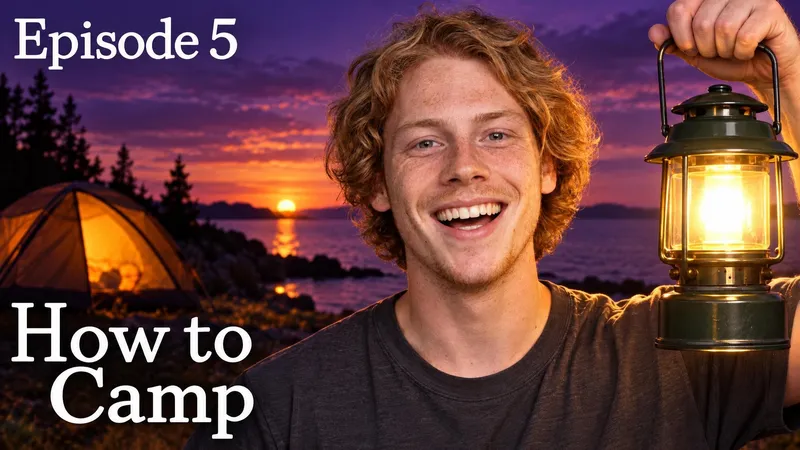
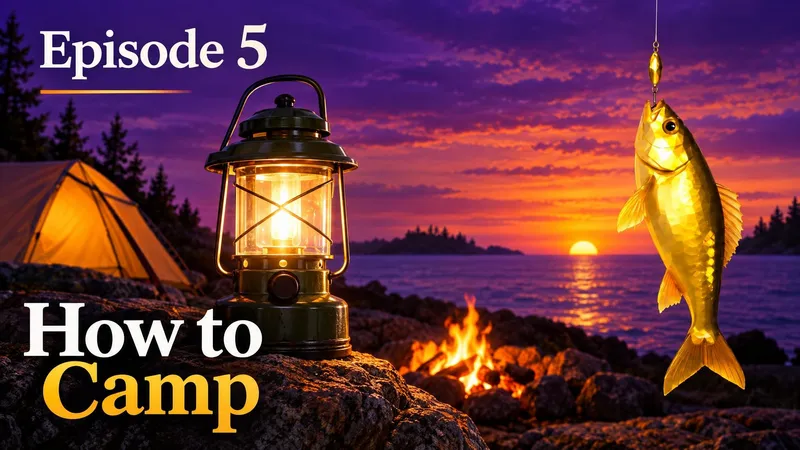
Each version can be a very different composition. It can also be a simple change like only changing the words. What you need to think about here is: when people see these two pictures, will they feel different things or think different things? If two or three pictures don't create any different feeling or idea from each other, then there's no point using them.
Test & compare makes the same point from the other side. If the options are too alike, its help page warns, a test can run longer, because there may not be enough of a difference to decide on a winner. The 2024 rollout post leans that way too, suggesting different layout compositions, or changes to the background, text overlays and object placement. A set of three that holds up under either feature could look like this.
- The one you'd post anyway. Your main design, the one you'd pick if YouTube took only one. In Test & compare, upload it first: an inconclusive test falls back to the first title and thumbnail you uploaded.
- A different composition. The same idea with the frame rebuilt: the object alone instead of your face, or a tight crop instead of a wide scene. Appleby's faceless example is this kind of version.
- Different words on the same picture. HOW TO CAMP against MY FIRST NIGHT ALONE says two different things about one photo. Words alone can change what a viewer expects from the video.
Whatever the three are, each has to be true to the video. Test & compare judges on watch time, not on the click, and YouTube hasn't named the measure for dynamic thumbnails, so a picture the video can't live up to is a poor bet either way. YouTube CTR covers why a high click rate alone isn't the goal.
If creators are bothered by different pictures being shown, say they really liked one of the designs and didn't like the other two, then they can make alternatives again from the first design with smaller changes.
How to do this in WThumb
- Make the main design. In Recreate, paste a YouTube link or upload a reference, say the words to print in the Changes box (change the title to "MY FIRST NIGHT ALONE"), pick your persona or Faceless and press "Make". Or press "Prompt" and describe the thumbnail, words included, in its one box. It costs 1 credit (1 credit = 1 thumbnail), and about thirty seconds later you have a 2048 x 1152 Full HD+ JPEG.
- Rebuild the composition for version two. Make the same brief again with the other choice: Faceless if version one had your persona, your persona if it was faceless. With Faceless, WThumb instructs the image model to remove people from the reference and fill the space, so look the result over.
- Change only the words for version three. Under the main design, press "Edit" and turn on "Mark an area". Mark the words with "Draw around" or "Brush" and type the new ones; the rest of the picture stays as it was, and the new version uses 1 credit.
- Read every letter. A generated image can still misspell a word or drop a digit, so check all three before they go anywhere.
- Put them to work in YouTube Studio. On a computer, run the three through Test & compare now, the main design first. When dynamic thumbnails reach your channel, the same three are ready to go.
Small changes from a design you love
Marking suits a creator who loved one design, because it changes the part you mark and keeps the rest. It works on thumbnails made in WThumb. A change typed in the Edit box without marking redraws the whole picture, told to keep everything the change doesn't mention, so expect small differences elsewhere.
Compare before you upload
Put two candidates in the thumbnail comparison tool to see them side by side before they take a slot. WThumb makes the images; it measures no clicks and can't tell you which version YouTube will favor. New accounts get two free credits, no card, enough for a main design and one version of it.