Picture your subscriptions feed in mid-December: one channel has posted every day since the 1st, and each new Vlogmas thumbnail looks a lot like yesterday's with a different scene in it. That resemblance tells followers "this is my Vlogmas, here's today's." The same picture still has to show everyone else, who never saw day 1, what happened in this one.
Getting both right comes down to a fixed frame (your face, plus the lettering and the spot where it sits) with each day's own moment inside it. We made four days of a series like that in WThumb, changing only the scene and the day number each time. We read every YouTube page linked in this post on November 20, 2026, and YouTube does edit them, so click through before you plan a month around one line.
What Vlogmas is, and what its thumbnails have to do
YouTube's Official Blog called Vlogmas "a fun tradition of daily videos throughout December leading up to Christmas" in a post from December 19, 2024, with themes like decorating, baking, gift wrapping and embracing traditions with family and friends. Our four WThumb runs borrow from that list: the tree goes up on day 1, the cookies burn on day 2 and the presents get wrapped on day 4, with a night out at a Christmas market in between.
YouTube's 2026 trends report, How creative formats supercharge holiday shopping on YouTube, is a PDF you download from that page, and it's more exact. It calls Vlogmas a digital Advent calendar where creators post daily vlogs from December 1 to 25, "25 consecutive daily uploads" in all, and says creator Ingrid Nilsen invented it in 2011. It also counts more than 250K videos with "vlogmas" in the title uploaded in December 2025, from YouTube Data for Global/US.
2011
The year YouTube's report says Vlogmas started
25
Daily uploads, December 1 to 25
250K+
December 2025 videos with "vlogmas" in the title
So what does a Vlogmas thumbnail have to do? Two jobs, for two kinds of viewer. YouTube's Thumbnail & title tips page says content targeting your subscribers "might highlight familiar features," while content targeting casual viewers "might focus on actions and emotions that are more universally relatable." In a daily series, the familiar part is the look your followers already know. The action is whatever happened today.
For someone who's already watching along, the thumbnail may not even be what decides it.
With series like this, if I've watched one of the videos before and I can more or less guess what kind of content it is, it may not matter to me whether the thumbnails are different or not. I already know the person, I already know the content. I go into the video and look for a few minutes at what it is. If it wins me over, I keep watching. If it doesn't, I leave.
A stranger landing on day 9 knows neither yet, so for them the picture has to show what happened that day.
What stays the same on every Vlogmas thumbnail
Put day 1 and day 14 next to each other in a feed. If a follower can tell they're the same series before reading a word, the frame is working. YouTube's Create shows from your videos page counts a consistent look among the common characteristics of a show: "Consistent look or feel: Use the same intro, same style of thumbnails, and same video format."
So which parts should stay put?
If I had the chance to put my face on it, I would always use my face. Because wherever you go, if your face is recognized, your chances are higher. After the face, colors can matter. Colors I use all the time can add recognition to the channel. But always using the same color can also be a disadvantage for some formats. It can limit how rich the design is.
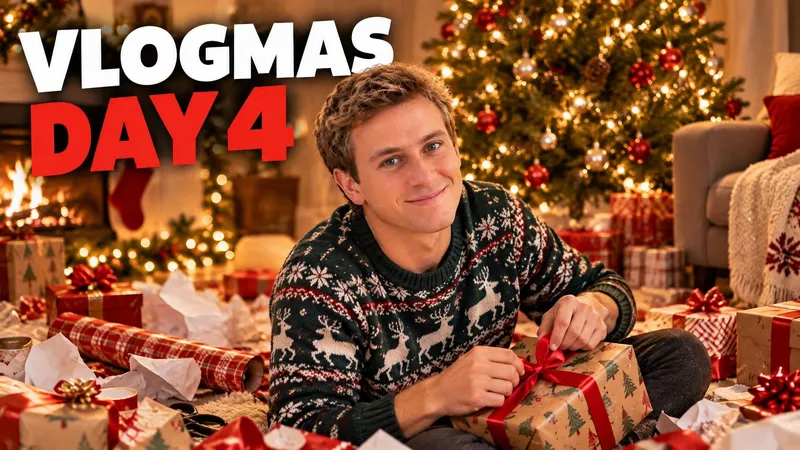
Vlogmas may well be one of those formats, since a living room at dusk and a market at night won't share a palette, and forcing them to would flatten both. One way through is to split it: fix the colors of the lettering and let each day's scene bring its own. In our runs the white VLOGMAS and the red DAY stayed the same, while day 3 came out as a dark, snowy night next to day 1's warm living room.
Reusing one image for the whole month is the thing to avoid, however tempting it gets around day 17. The same thumbnail on multiple videos goes into why.
Then there's the day number. In our runs, VLOGMAS DAY 1 to 4 were the only words, big in the top left. The other way gives the big words to the day's moment (BURNT EVERY COOKIE) and shrinks the count to a small label in one corner. The episode number on a YouTube thumbnail covers when a number is a promise and when it's only a label. We'd keep the big VLOGMAS DAY 9 on a quiet day, since the picture carries the moment and the series name is the part followers know. On a big day, like a first snow or a surprise visit, give the moment the words and let the count go small.
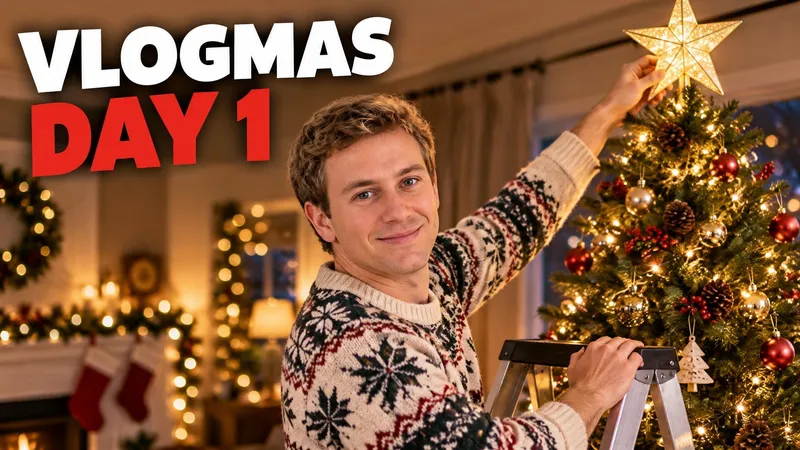
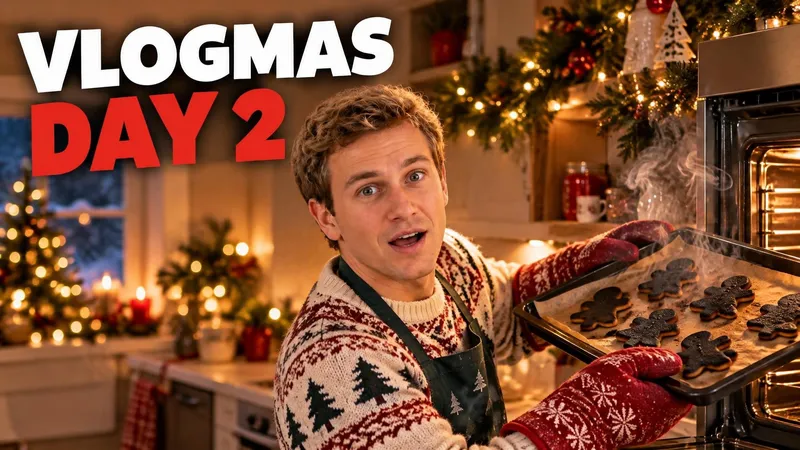
| Part | Kept on all four days | Changed each day |
|---|---|---|
| Person | The sample persona, facing the camera | Clothes and expression: smiling on days 1, 3 and 4, surprised on day 2 |
| Words | VLOGMAS over DAY and a number, top left | The number |
| Lettering | White VLOGMAS, red DAY N, the same heavy type | Nothing |
| Scene | Christmas lights in the frame | Tree, oven, market, presents |
A new moment every day, and a routine that lasts the month
It's day 9, nothing big happened, and the video still needs a picture at 11 at night. You filmed a grocery run and a bit of wrapping, and that's about it.
If the videos don't keep covering different topics, it can be hard to make a new picture that grabs attention. If there is one, I would catch an attention-grabbing moment from each video and use it in the title and the thumbnail.
On day 9 that moment can be small, like the tape running out halfway through a present. Put it in the title and the thumbnail both, and a quiet day still has something to promise.
YouTube's report points to the same habit. It says creator Zoe Sugg has kept up the tradition since 2013 and varies the focus of each daily episode, while still bringing the caroling, decorating, family visits and shopping hauls her fans look forward to.
Two lines on YouTube's tips page help with the daily grind. One recommends "Taking pictures during your shoot so you have several options for thumbnails when you upload your video," which on a vlog means grabbing a photo the second something happens. The other, about titles, says "Save episode numbers and branding for the end," so the moment leads and the count follows: Burnt every cookie | Vlogmas Day 2. If you're torn between your face reacting and the scene itself, vlog thumbnail ideas weighs one against the other.
Scheduling ahead takes the late-night pressure off, with one catch. YouTube's Add custom thumbnails page says there's a limit to how many custom thumbnails a channel can upload each day, and it doesn't give a number. If you get "Daily custom thumbnail limit reached," it says to try again in 24 hours. So don't plan on uploading the whole month's thumbnails on November 30; spread them over several days. If the date under each video matters, YouTube's Schedule video publish time page says the date on the watch page is based on Pacific Standard Time, so schedule each day to go public on its date in PST.
Take stills while filming
Grab a photo whenever something happens, so you have several options when it's time to upload.
Pick the day's moment
Choose the one thing that happened today and use it in both the title and the thumbnail.
Same frame, today's scene
Keep your face and the lettering where it always sits, and put today's moment in the scene.
Check DAY and the digits
Read the day number on the finished picture before it goes anywhere. A missing digit is easy to overlook.
Title first, number last
Lead the title with the moment and save the Vlogmas day number for the end.
Upload or schedule it
Add the thumbnail in YouTube Studio. If you schedule ahead, spread the uploads over a few days.
Christmas YouTube thumbnail sizes, vertical days and the playlist
A Christmas YouTube thumbnail uses the same sizes as one made in July. YouTube's Add custom thumbnails page recommends 3840 x 2160 pixels for videos and 2160 x 3840 for Shorts, with a minimum width of 640 pixels for videos and a minimum height of 640 pixels for Shorts. Upload it in a format such as JPG or PNG. The file limit depends on where you upload from: 2 MB for a video thumbnail on mobile, 50 MB on desktop. Aim for 16:9 on videos and 9:16 on Shorts.
Vertical days need a little more care. Say day 12 is a phone clip you post as a Short. The page says a vertical video with a 16:9 custom thumbnail gets replaced by an auto-generated 4:5 thumbnail on the home, explore and subscription pages, so the frame you designed won't be what people see there. Give that day its own 9:16 picture instead. Custom Shorts thumbnails can only be added in YouTube Studio on a computer, and your account must be verified to use the feature.
If the vertical days make up a Shorts series, the Create shows page says "you can also upload unique custom thumbnails for each individual Short within the series," so each one keeps its own picture. That kind of series holds only Shorts, portrait or square and 180 seconds at most. If you turn the main playlist into a show, the Serial kind lists episodes oldest to newest, the order a countdown is watched in.
The playlist needs a cover too, and the series needs an ending. YouTube's report says Vlogmas often ends with a "What I Got For Christmas" video, which some creators use as a capstone for their Vlogmas playlists. A YouTube playlist thumbnail covers how to add a cover and what to put on it, and there's more on vertical covers on our Shorts thumbnail maker page.
How to do this in WThumb
- Make day 1 from Prompt. Press "Prompt" and pick your persona or Faceless. Write the scene and the exact words to print in its one box, where "Me" means the persona you picked. With Faceless, WThumb tells the image model to leave out any host or presenter, so look over the result.
- Keep the day 1 file. Download it from the button under the picture. A Studio reload won't bring it back, but "My thumbnails" keeps it, and its page has "Download".
- From day 2, press "Recreate" and upload day 1. Use the same day 1 file every day, the same persona and "Designs" at 1. With 1 design, WThumb asks the model to follow the reference closely. An upload is a reference, so each day is a new design made from it.
- Change the words and the scene. Both go in the Changes box, each on its own line: change the title to "VLOGMAS DAY 2", then the new scene and a request to keep the words in the same place.
- Press "Make" and check the number. Each picture is its own run at 1 credit (1 credit = 1 thumbnail), takes about thirty seconds and comes back as a 2048 x 1152 Full HD+ JPEG. A generated image can still drop a digit, and DAY 12 coming back as DAY 1 is easy to miss. To fix it, press "Edit", turn on "Mark an area", go over the number with "Draw around" or "Brush" and type what it should say; the rest of the picture stays as it was, for the same 1 credit.

Why day 1 every time
We uploaded day 1 again for days 2, 3 and 4, not the day before, so every new day came from the same picture. The fewer changes you ask for, the closer the result stays to the original. New accounts get two free credits, no card needed, enough for days 1 and 2.
A brief to paste
- Prompt, for day 1. Thumbnail for day 1 of my Vlogmas series. Me on a step ladder putting the star on top of a tall Christmas tree in my living room, fairy lights everywhere, warm evening light, smiling at the camera. Big words top left: VLOGMAS DAY 1
- Changes, from day 2. Change the title to "VLOGMAS DAY 2"
- Next line. Change the scene to me pulling a tray of burnt gingerbread cookies out of the oven, surprised face, a little smoke rising. Keep the same colors, the same lettering and the words in the same place.