AI tools for a faceless YouTube channel can now help with nearly every job on it: finding the facts, drafting the script, reading it aloud, cutting the footage, generating the shots nobody filmed, and making the thumbnail and the title. For one person without a camera crew, that's most of the week.
What no tool decides for you is how the channel sounds and looks from one video to the next, and that's the part viewers learn to recognize. We read every YouTube page linked in this post on November 20, 2026, and each tool's own site the same day. Both change often, so check before you build on one line.
The jobs on a faceless channel, and what AI can take on
Picture someone running a faceless history channel alone. In one week they read up and outline, record the narration, spend two days cutting, hunt for footage of places nobody filmed, and make the thumbnail the night before upload. Each of those jobs now has an AI tool aimed at it, from chat assistants for the reading to editors that cut the timeline.
I use Claude for video editing too. For pictures I use WThumb, of course. I also use Claude for research. I use AI for almost the whole workflow, and it gets pretty easy this way. Claude can prepare the research and the video from start to finish. Then after WThumb makes the picture, the video is ready.
You don't have to hand over that much, and each job needs a different kind of help.
| Job | What AI can take on | Tools named here | The YouTube line to know |
|---|---|---|---|
| Research and script | Finding sources, outlining, drafting, feedback on a draft | Claude, Ask Studio | AI help with an outline or a script needs no AI label |
| Voice | Reading the script aloud, a clone of your own voice, dubs | ElevenLabs, CapCut, automatic dubbing | Cloning your own voice for voiceovers or dubs needs no label |
| Editing | A first cut, filler words and retakes out, short clips from a long video | Descript, CapCut, YouTube Create, Claude | The final product must still demonstrate your creative vision |
| Footage and pictures | Short clips and images from a prompt, animated charts | YouTube Create, Claude Motion | A realistic scene that didn't actually occur needs the label |
| Thumbnail | A designed picture with no presenter in it | WThumb, Ask Studio | You can upload your own only with a verified account |
| Titles and captions | Title ideas, captions, dubbed audio tracks | Ask Studio, automatic captions | Maliciously misleading titles and thumbnails count as spam |
None of this changes YouTube's rules for the format, which how to start a faceless YouTube channel covers in full. With AI doing the work, two lines matter most: the label for realistic AI content, and the rule against videos that feel mass-produced.
AI for the research and the script
With no face on screen to carry a thin idea, the script does most of the work, and the research is what it stands on. A chat assistant with web search can gather sources and outline your notes. Claude's product page lists web search for current information, plus Projects that keep context, instructions and files organized by project, which suits a series.
YouTube has an assistant of its own. Its Ask Studio page calls it an AI creative partner built into YouTube Studio, for brainstorming video ideas and generating titles and thumbnails. You can paste a script in for feedback based on creative best practices, or pick a draft, private or unlisted video for suggestions that also use historical retention data.
How far should you trust what comes back? Ask Studio's page says the quality and accuracy of its responses may vary. Check every date, name and number against a source you can open.
The Disclosing use of GenAI content page lists idea generation, and AI help with an outline or a script, among the things you don't need to disclose. The channel monetization policies even give using AI to edit your video scripts as an example of a tool serving a well-researched narrative. The hard line is a persona: a channel that gives health, legal, financial or political advice through an AI persona presented as a human expert isn't allowed to monetize, and YouTube's AI content policy covers that rule and the rest.
Editing with AI, and giving it your own style
Most of a faceless video's hours go into the timeline: trimming dead air, cutting retakes, laying footage over the narration. That's the job AI editors are built around.
For video editing I would definitely use AI. I'd even use Claude for video editing.
Descript's site describes an AI co-editor you can direct, and editing the video by editing its words, with filler words and retakes cut in a click; it also lists an MCP for editing from inside your AI assistant. CapCut lists EditPilot, which turns your direction into edits on the timeline. YouTube's Create with AI in the YouTube Create app page says Edit with AI turns up to 25 clips and photos into a first draft with music and effects, at lengths up to 60 seconds. And Claude's marketplace lists an OpusClip connector, which turns long videos into short clips from inside Claude.
In video editing, when you just tell Claude "edit this video", good things don't come out. Even if they do, everyone does it, so all the videos look alike, and you have nothing different from the others anymore. You need to give Claude instructions special to your own video style and create a certain style. That way your channel has its own style, and in the next videos viewers slowly start to get to know you and adopt your style.
The monetization policies say much the same thing: if you use automated tools or templates, the final product must still demonstrate your creative vision. Claude's product page lists Instructions for Claude, preferences that apply across every conversation, so a style you write once can go with every edit.
Write your style down
Pacing, cut length, caption look, music level and how every video opens, in plain sentences.
Send it every time
Give the same style notes with each new video, so the editor never starts from its defaults.
Watch the first cut
Check the facts on screen, the timing and the voice yourself before anything else changes.
Ask for exact fixes
Name the change and where it goes, such as the pause after the intro, instead of asking for a new edit.
Grow the style notes
When a fix would apply to every video, add it to the notes for next time.
Footage and pictures when nobody is on camera
With nobody on camera, every second of screen time comes from somewhere: footage you shot, licensed stock, a screen recording or a generator. Generators fill the shots you could never get, like a ship in a storm in 1912, and when they look real, those are the shots the AI label is about.
The same Create with AI page describes two generators in the app. Gemini Omni makes vertical or horizontal clips up to 10 seconds long, from a prompt of up to 900 characters and up to 3 reference images. Nano Banana makes four images per prompt, and one of them can become an 8-second video. Like Edit with AI, both are experimental and open to a limited number of creators in select countries.
10 sec
The longest clip Gemini Omni makes
900
Characters in one prompt
4
Images from each Nano Banana prompt
8 sec
A video made from one chosen image
Animation suits explainers. Anthropic's help article on Claude Motion, in beta on Team and Enterprise plans, says it builds short animations, an animated chart for example, as code you export as MP4, and that it doesn't create realistic footage or people.
That difference decides the label. The Disclosing use of GenAI content page asks you to disclose a realistic scene that didn't actually occur, such as a tornado moving toward a real city that never happened, while an AI-generated animation of a missile in a fully animated video needs no label. Anything made with YouTube's own GenAI tools may be labeled automatically, and the page says that label can't be adjusted.
The voice and the thumbnail, where AI shows first
A viewer meets two parts of a faceless video before any of the research: the thumbnail in the feed, then the voice in the first seconds.
If enough work goes into the videos, I think even if they're faceless or made with AI, they become watchable. High-quality videos get made. What matters is how well the creator knows the tools. For example, it's faceless, but do they do their own voiceover? Is the sound quality good? If they don't do a voiceover, can they do the AI voiceover well? Is the voice's intonation nice? Are they using a robotic voice?
Or if they made the thumbnail by going to ChatGPT with a simple prompt, it's obvious it's AI right away, and that creates a bad first impression for the video. When I see thumbnails like that, I usually don't click. That's why WThumb has Templates and Recreate. They give you designs that don't look like AI, while AI helps you make your own version, and the templates are layouts a lot of channels already use. In Recreate, you take a video you like, or one you think gets a lot of clicks, and adapt its thumbnail to yourself very easily.
Voice tools
ElevenLabs' text to speech page says its voices respond to emotional cues and that you can replicate your own voice or design a new one. Its instant clone works from a short recording, and you can only clone a voice you have permission to use. CapCut lists text to speech and custom voices too.
The GenAI page lists cloning your own voice for voiceovers or dubs among the things you don't need to disclose. Making a real person appear to say something they didn't say does need disclosing, and so does AI-generated music.
Thumbnail tools
YouTube's Add custom thumbnails page says Ask Studio can suggest thumbnails by analyzing your video's transcript and themes, and that you can upload your own if your account is verified. Are AI thumbnails a turnoff goes through what viewers object to in generated ones, and faceless thumbnails without a person through what can fill the frame instead.
Titles, captions and dubs
YouTube's own tools already cover a lot of the packaging. Ask Studio generates titles as well as thumbnails, and YouTube's Spam Policy is the line to hold any suggestion to: titles or thumbnails that maliciously mislead people into clicking on a video that doesn't deliver what was promised count as malicious clickbait. YouTube's Thumbnail & title tips page puts it more plainly: make sure the title accurately represents the video, because if it doesn't, viewers may stop watching. Viewers may see only part of a title, it adds, so keep it short and put the most important words first, and the same goes for editing a YouTube title after the video is out.
YouTube's Use automatic captioning page says speech recognition creates captions, that they can misrepresent what was said because of mispronunciations, accents or background noise, and that you should always review them. If an AI voice mangles a name, that's the line to check first.
Dubs take a faceless video into other languages without a second narrator. YouTube's Use automatic dubbing page says translated audio tracks are on by default for eligible creators and marked as auto-dubbed in the description. Some languages support expressive speech, which replicates the speaker's pitch and intonation. A video with only music or very fast speech may not qualify, and you can't edit an automatic dub, though you can review dubs before they're published.
How to do this in WThumb
For the thumbnail I'd use WThumb, because on faceless channels, since your face doesn't show, making a picture is a bit more work. I can use the ready templates in WThumb; there are ready templates for faceless channels. Or I can turn a normal thumbnail faceless, even if there's a face in it. Or I can have WThumb make a thumbnail for a faceless channel just by writing a prompt.
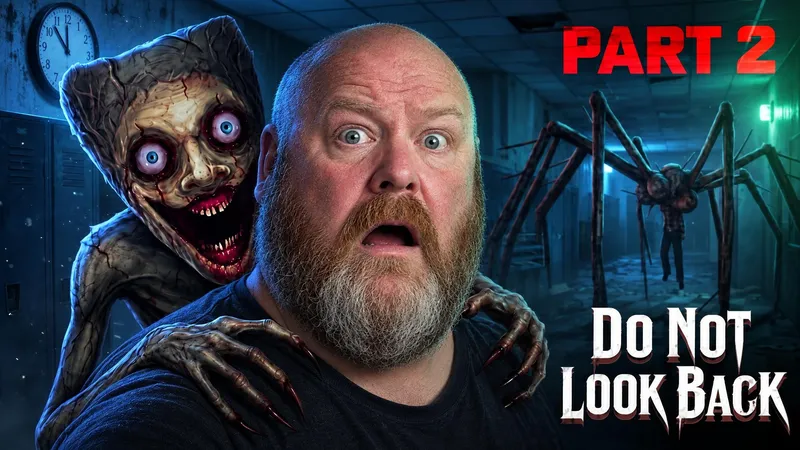
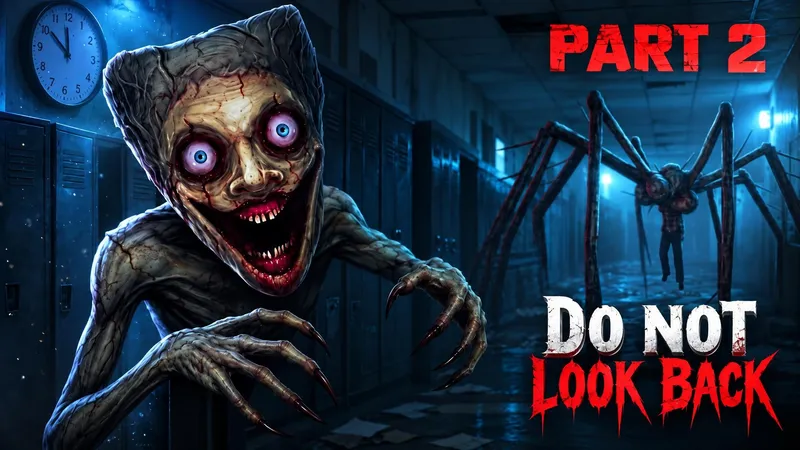
- Choose a way in. Press "Templates" and open the Faceless tab, stay on "Recreate" and add a thumbnail you like with "Link" or "Upload", or press "Prompt" and describe the picture.
- On a Faceless template, press a card. It takes no persona and no photo of you: describe what you want in "Prompt" and type the words to print in "Text on the thumbnail". Each template run makes one 16:9 picture.
- On Recreate or Prompt, pick Faceless. Make waits for your persona or Faceless. With Faceless, WThumb instructs the image model to remove people, and on Prompt the Studio says "No photo of you goes in". On Recreate, write the words to print in the Changes box, or ask for no text on it.
- Press Make. Recreate and Prompt can make 16:9, 9:16 or both, one or two designs. Each picture is a run that uses 1 credit (1 credit = 1 thumbnail) and comes back in about thirty seconds as a Full HD+ JPEG, 2048 x 1152 or 1152 x 2048.
- Revise, or go vertical. "Edit" under any finished picture takes a change in plain words, one credit per revision, and a 16:9 picture can also get "Make the Shorts version" where it's offered.
Look at what Faceless kept
Faceless is an instruction, and the image model is also told to keep a game or cartoon character, a creature or a mascot as the same character. In the horror pair the man in front is gone, but the creature and the small figure hanging under the spider stayed, as they were in the reference. Check the background too, and press Edit for anything that shouldn't be there.
A brief to paste
- Prompt, with Faceless picked. Thumbnail for a scary story narration video. An empty hospital corridor at night, one ceiling light flickering, a wheelchair at the far end facing away, cold blue light, no people. Words on it: ROOM 14 WAS EMPTY